Heart Rate Discrimination task#
The Heart Rate Discrimination task (HRD) [Legrand et al., 2022] measures judgements of one’s own heart rate. Participants attend to their heartbeat, listen to a sequence of tones, and judge whether the tones were faster or slower than their heart.
Across trials, these responses define a psychometric function. Its threshold estimates bias in perceived heart rate, and its slope describes the precision of those judgements. Optional confidence ratings allow researchers to examine how confidence relates to performance. Measuring cardiac interoception explains the interpretation and limits of these measures.
What a trial looks like#
A trial begins with a fixation cross for 0.25 s. The participant then attends to their heartbeat for 5 s while the task records the pulse and estimates heart rate. A sequence of tones follows at the measured rate plus a signed difference, Alpha, in beats per minute.
The participant has 5 s to judge whether the tones were faster or slower than their heart, using the mouse buttons or the up and down arrow keys. They then rate their confidence on a 0 to 100 slider with the mouse, or in ten steps with the keyboard. The rating period lasts between 0.5 and 5 s.
By default, half the trials form an exteroceptive control condition. The participant listens for 5 s to a reference tone sequence at a random rate between 40 and 100 BPM, then judges whether a second sequence is faster or slower. The response procedure and confidence rating are the same as in the interoceptive condition.
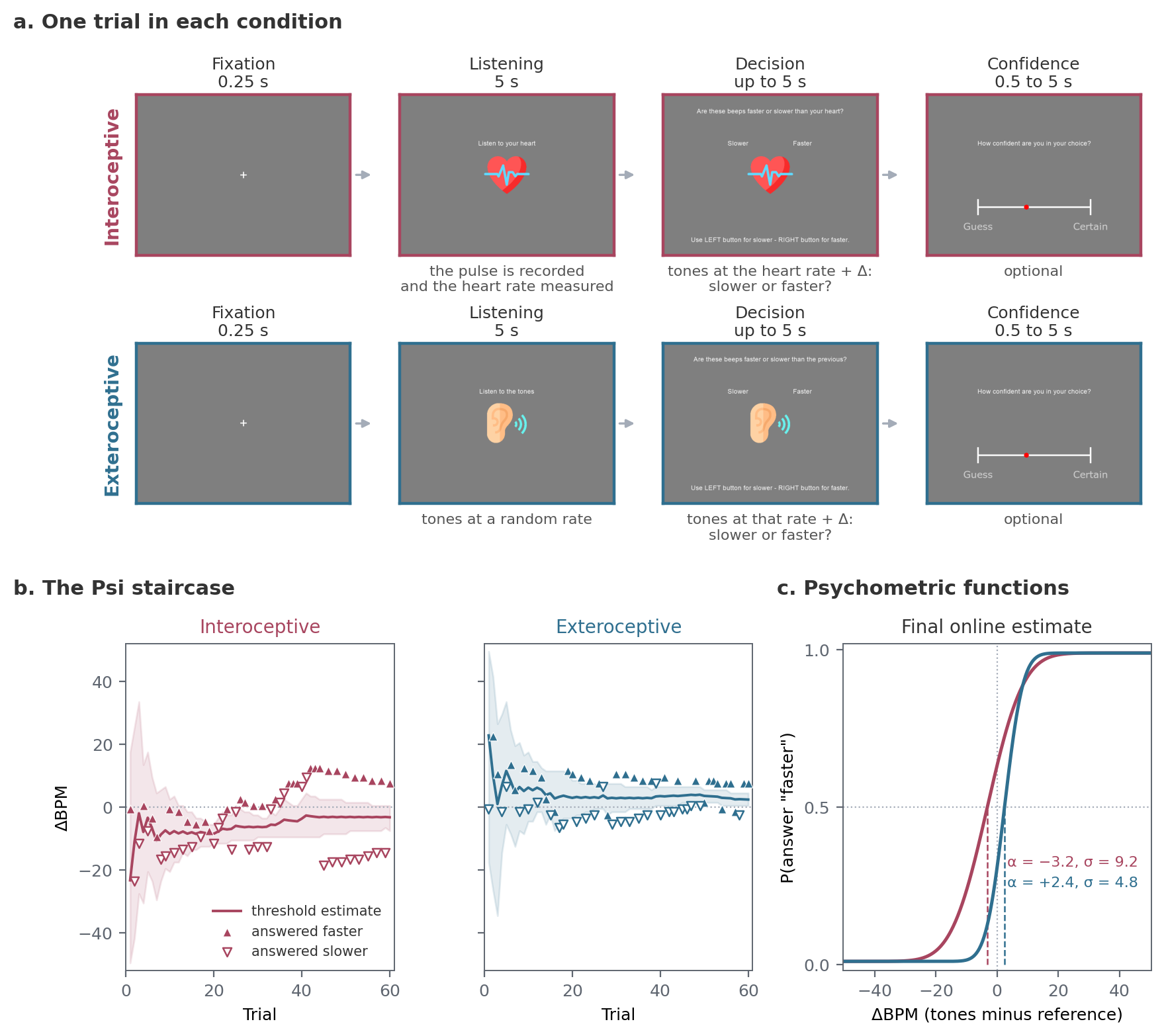
(a) The screens for one trial in each condition, with the default durations; a 0.5 s fixation precedes the decision. (b) The Psi staircase for one participant from the Visceral Mind Project, showing each trial’s ΔBPM and response, along with the threshold estimate and its 95 percent interval. (c) Psychometric functions drawn from the staircase’s final online estimates, with the threshold (α) at 50 percent “faster” responses. The tutorials explain how to fit psychometric functions to the trial data for analysis.#
Each condition has a separate Psi staircase [Kontsevich and Tyler, 1999]. On each trial, it chooses Alpha between -50.5 and 50.5 ΔBPM to obtain information about the participant’s threshold and slope.
If the participant does not respond in time, the task records DecisionProvided as false and leaves the staircase unchanged. By default, the missed trial returns to the end of the queue (onMissedTrial="represent"), with at most three presentations.
With runTutorial=True, the session begins with instructions and practice. Participants first complete five trials per condition with feedback at a difference of 20 BPM (nFeedback), then eight per condition with confidence ratings and no feedback (nConfidence).
The main task contains 120 trials by default, 60 per condition, with a break every 20 trials. The four example sessions in the documentation took 20 to 22 minutes without the tutorial, or about 10 s per trial. At that pace, the 26 practice trials add about 5 minutes, plus time for the instructions.
What you need#
A pulse oximeter on a USB port (the Nonin 3012LP Xpod by default), or an ECG or PPG device streaming over Lab Streaming Layer. Recording devices covers both and how to check the oximeter before a session.
Headphones or speakers.
A mouse or a keyboard.
Running it#
The repository ships a wrapper for the oximeter, wrappers/hrd.py, and one for LSL, wrappers/hrd_lsl.py. Copy the one you need next to your data folder and run it:
python hrd.py
A dialog asks for:
Field |
Default |
What it sets |
|---|---|---|
participant |
|
The participant identifier |
session |
|
The session identifier |
Serial port |
|
The port the oximeter is on. |
Setup |
|
|
Device |
|
|
Language |
|
The instructions |
The LSL wrapper asks for the stream name, the channel label and the signal type (ecg or ppg) instead of the port and setup.
To run the task from a Python script:
from cardioception.HRD.parameters import getParameters
from cardioception.HRD.task import run

parameters = getParameters(
    participant="Subject_01", session="HRD", serialPort="COM3",
    setup="behavioral", nTrials=120, exteroception=True)
run(parameters, confidenceRating=True, runTutorial=True)
parameters["win"].close()
With an LSL device, pass a recorder instead of a port and close it at the end:
from cardioception.devices import LSLRecorder

recorder = LSLRecorder(name="PLUX", channel="ECG2", signal_type="ecg")
parameters = getParameters(participant="Subject_01", session="HRD", recorder=recorder)
run(parameters, confidenceRating=True, runTutorial=True)
parameters["win"].close()
recorder.close()
Escape ends the session; what has been collected is saved.
The main settings#
The following arguments to getParameters control the session:
Argument |
Default |
Meaning |
|---|---|---|
|
120 |
Trials in all. With |
|
|
Include the exteroceptive control condition |
|
|
|
|
|
|
|
by device |
A |
|
0.0 |
Share of trials at a fixed difference instead of the staircase’s, cycling through -30, +10, -20, +20, -10 and +30 BPM, to control the range of stimuli. They do not update the staircase. 0.2 if used |
|
|
Re-present a trial with no answer ( |
|
20 |
Trials between breaks |
|
0 |
The screen the task window opens on |
|
|
Root of the run directories |
|
|
Allow writing into a run directory that already holds results |
|
drawn |
Seeds the session’s random generator; recorded in the manifest |
|
|
The only staircase. The nUp/nDown staircase was removed in 1.0.0, so |
To change trial timing or staircase bounds, pass a TaskConfig object as config=:
from cardioception.HRD.config import TaskConfig

parameters = getParameters(..., config=TaskConfig(respMax=8, nFeedback=10))
Field |
Default |
Meaning |
|---|---|---|
|
5.0 s |
The listening window in both conditions |
|
5.0 s |
Time to answer |
|
0.5, 5.0 s |
Bounds on the confidence rating |
|
40 to 120 BPM |
A heart rate outside this range is treated as artefact and the window retaken, up to |
|
40 to 100 by 0.5 |
The rates the exteroceptive reference is drawn from |
|
|
The Psi settings for both staircases, below |
|
From the preset |
The stimuli the staircase may present, and the thresholds and slopes it considers, in ΔBPM. A value set here applies to both conditions |
|
From the preset |
The lapse rate, held fixed |
psiPreset chooses between two sets of Psi settings. "legacy" is the setting of the original paper and of every earlier release: the same uniform ranges in both conditions. "courtin" narrows the ranges separately for each condition, to what the hierarchical refit of the Visceral Mind Project data found plausible, and halves the lapse rate [Courtin et al., 2026].
Stimuli |
Threshold α |
Slope σ |
Lapse |
|
|---|---|---|---|---|
|
-50.5 to 50.5 |
-50.5 to 50.5 |
0.1 to 25 |
0.02 |
|
-50.5 to 50.5 |
-42 to 26 |
3.2 to 29 |
0.01 |
|
-50.5 to 50.5 |
-9 to 9 |
2.5 to 15.2 |
0.01 |
PsychoPy’s Psi method takes only a uniform prior, so the narrower ranges concentrate it, and the staircase spends fewer trials on implausible values. The ranges are also hard bounds: a participant whose threshold lies outside them is estimated at the edge. Sessions run with "legacy" remain directly comparable with published data. The settings each staircase used are written to manifest.json.
parameters = getParameters(..., config=TaskConfig(psiPreset="courtin"))
The staircase is response-coded, so it converges on the point of subjective equality between faster and slower, which is the participant’s bias, not on a target level of accuracy. That is what the task is designed to measure, but it has consequences for any measure scored against the true heart rate; see the metacognition tutorial. Tone sequences exist for 15 to 199 BPM, so a rate outside that range is clamped and the staircase is told the clamped value.
What it saves#
A session writes to data/sub-<participant>/ses-<session>/run-<YYYYMMDD-HHMMSS>/, under resultPath when it is given. Every file name carries the three identifiers.
File |
Contents |
|---|---|
|
One row per trial |
|
The pulse recorded in every interoceptive listening window, with the trial number and each sample’s time |
|
The oximeter recording, saved at every break and at the end, with the trigger codes in |
|
The staircase posterior after each trial |
|
The settings, the seed and the version, written before the first trial |
|
The rows written after every trial, the parameters at the end, and the session’s log |
The main columns in *_final.txt are:
Column |
Meaning |
|---|---|
|
|
|
The reference rate, the rate of the tones, and their difference in ΔBPM |
|
|
|
Whether the decision matched the sign of |
|
The rating on the scale shown. |
|
Whether the answer and the rating were given in time |
|
The staircase’s own running estimates. |
listenBPM is the rate over the listening window, 60000 / mean(IBI). Before 1.0 it was the mean of the per-beat rates, about 0.33 BPM higher on real PPG, so sessions run with 1.0 are not directly comparable to published ones on this column; the old value is kept as listenBPM_arithmetic.
The inspecting data tutorial describes every column.
Reading the results#
EstimatedThreshold and EstimatedSlope are a by-product of the staircase. Plot them to check that a session converged. They are not an analysis and must not be used as a dependent variable in a group-level test.
For analysis, model the trial-level responses (Decision) as a function of stimulus intensity (Alpha) and condition (Modality). The Hierarchical Interoception toolbox [Courtin et al., 2026] provides the models and priors. The tutorials explain data inspection, psychometric modelling, and the separate analysis of confidence ratings.
Reliability#
In the validation study, 190 participants ran the task a second time, about seven weeks after the first session. The test-retest correlation was r = 0.51 for the threshold and r = 0.10 for the slope [Legrand et al., 2022].
Where to go next#
Measuring cardiac interoception: why the HRD measures beliefs about heart rate, and what you may conclude from it.
Tutorials: inspecting a session, fitting psychometric functions, hierarchical models and metacognition.
API: every argument of
getParametersand every field ofTaskConfig.