Heartbeat Counting task#
The Heartbeat Counting task (HBC) [Schandry, 1981, Dale and Anderson, 1978] compares the number of heartbeats a participant reports during a fixed interval with the number recorded. It is an established task with a large literature, in which the score is commonly interpreted as interoceptive accuracy.
A good score can also result from a plausible estimate of heart rate, without reliable perception of individual beats. What heartbeat counting can establish reviews the evidence and its implications for interpreting a counting score.
What a trial looks like#
A tone marks the start of the window. The participant silently counts the heartbeats they feel while the pulse is recorded. A second tone marks the end. They then type the number they counted and press enter, and rate their confidence from 1 (“Guess”) to 7 (“Certain”) on the keyboard.
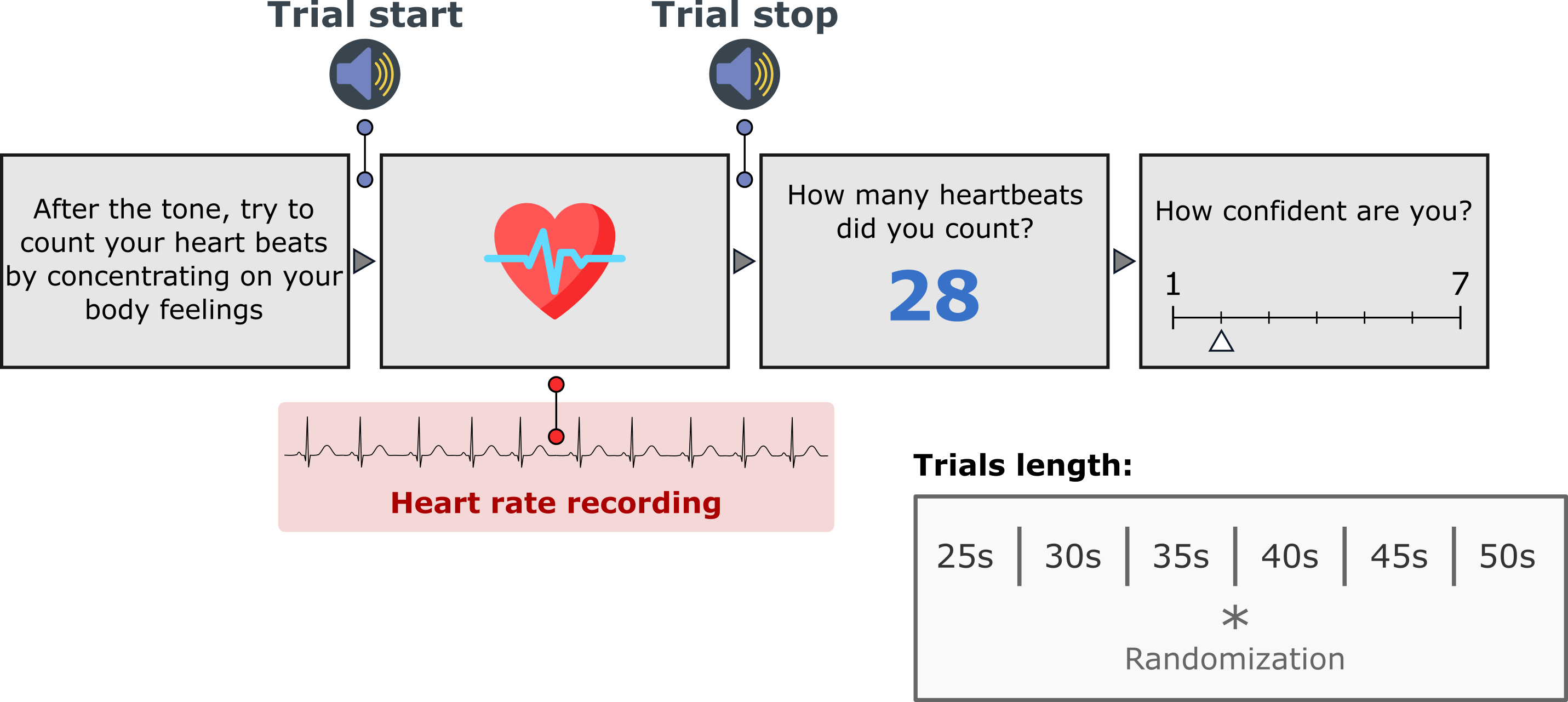
One HBC trial. The window lengths and the 1 to 7 confidence scale are the defaults.#
The default version, taskVersion="Garfinkel", presents six counting windows of 25, 30, 35, 40, 45, and 50 s in random order. The taskVersion="Schandry" version presents three windows of 25, 35, and 45 s in that order, following a minute of rest and separated by 30 s rest periods.
With runTutorial=True, the session begins with instruction screens. Every version also records the pulse during a 30 s rest before the first window. The default version takes about 4 minutes.
What you need#
A pulse oximeter on a USB port (the Nonin 3012LP Xpod by default), or an ECG or PPG device streaming over Lab Streaming Layer. Recording devices covers both and how to check the oximeter before a session.
Speakers or headphones for the start and stop tones.
A keyboard.
Running it#
Copy wrappers/hbc.py from the repository next to your data folder and run it:
python hbc.py
A dialog asks for the participant and session identifiers, the serial port the oximeter is on (python -m cardioception.check_device --list lists the ports), the setup and the language. The same in a script:
from cardioception.HBC.parameters import getParameters
from cardioception.HBC.task import run

parameters = getParameters(
    participant="Subject_01", session="HBC", serialPort="COM3",
    setup="behavioral", taskVersion="Garfinkel")
run(parameters, runTutorial=True)
parameters["win"].close()
With an LSL device, pass recorder=LSLRecorder(name="PLUX", channel="ECG2", signal_type="ecg") instead of a port, as on the HRD page. setup="test" replays a recorded pulse, for checking a script without a device. Escape ends the session.
The main settings#
Argument |
Default |
Meaning |
|---|---|---|
|
|
|
|
|
|
|
|
A |
|
|
|
|
|
The port the oximeter is on |
|
|
Root of the run directories |
|
|
Allow writing into a run directory that already holds results |
|
drawn |
Seeds the order of the windows; recorded in the manifest |
|
none |
|
To define a custom schedule, edit parameters["times"] and parameters["conditions"] after getParameters returns. These contain the window lengths and the corresponding conditions ("Rest" or "Count").
What it saves#
A session writes to data/sub-<participant>/ses-<session>/run-<YYYYMMDD-HHMMSS>/, under resultPath when it is given.
File |
Contents |
|---|---|
|
One row per window |
|
The pulse recorded during the rest and during window |
|
The settings, the seed and the version, written before the first trial |
|
The rows written after every window, and the session’s log |
The columns of *_final.txt:
Column |
Meaning |
|---|---|
|
The window number, from 0 |
|
|
|
The length of the window in seconds |
|
The number the participant typed |
|
The rating on the scale shown, and its response time. |
The task saves the pulse recording without counting the beats. Obtain the recorded count for each window by detecting beats in its pulse file.
Scoring#
Detect the beats in each *_ppg-<n>.txt file, count them, and score each window with the accuracy of Hart et al. [2013]:
A score near 1 is consistent with feeling every beat, and also with knowing one’s resting heart rate; the score cannot separate the two.
Where to go next#
What heartbeat counting can establish: the evidence on what a counting score identifies.
API: every argument of
getParameters.