
Recording PPG signal#
The py:class:systole.recording.Oximeter class can be used to read incoming PPG signal
from Nonin 3012LP Xpod USB pulse oximeter together with the Nonin 8000SM ‘soft-clip’
fingertip sensors. This function can easily
be integrated with other stimulus presentation software like PsychoPy to record cardiac activity during psychological
experiments, or to synchronize stimulus delivery around cardiac phases (e.g. systole or
diastole).
# Author: Nicolas Legrand <nicolas.legrand@cfin.au.dk>
# Licence: Apache-2.0
Recording PPG singal#
from systole.recording import Oximeter
from systole import serialSim
Recording and plotting your first PPG time-series only require a few lines of code: First, open a serial port. Note that here we are using Systole’s PPG simulation function so the example can run without any device plugged on the computer for the demonstration. If you want to connect to an actual Nonin pulse oximeter, you simply have to provide the port reference it is plugged in (see commented lines below).
ser = serialSim()  # Simulate a device

# Use a USB device
#import serial
#ser = serial.Serial("COM4")  # Use this line for USB recording
Once the reference of the port created, you can create a recording instance, initialize it and read some incoming signal in just one line of code.
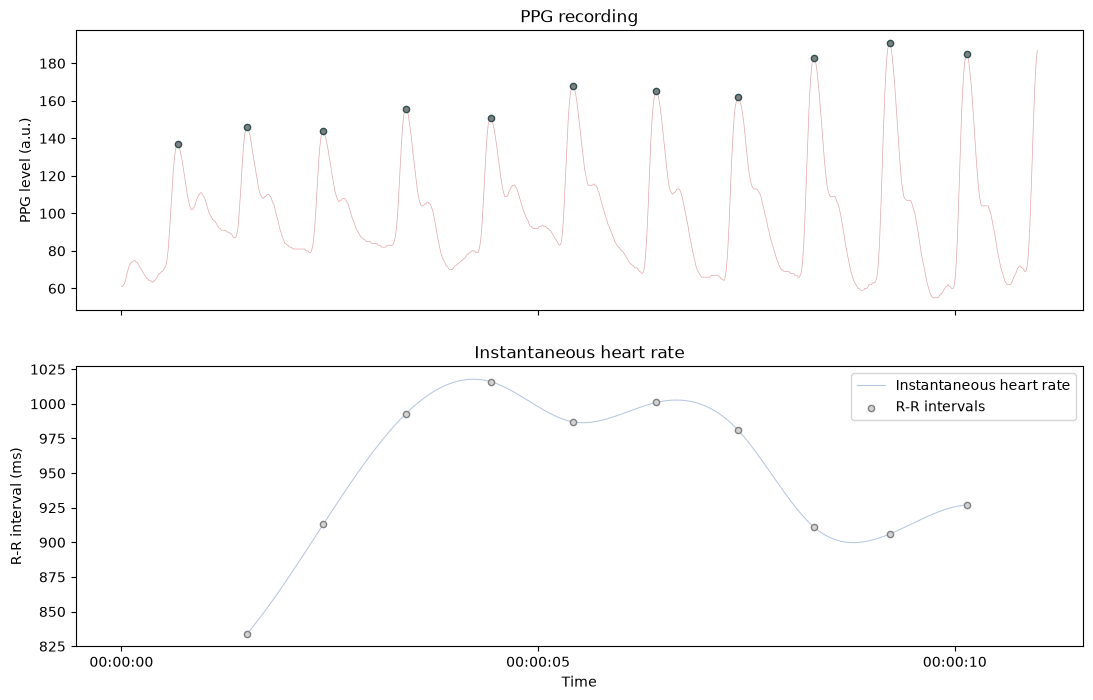
can be directly plotted using built-in functions.
oxi.plot_raw(show_heart_rate=True, figsize=(13, 8))
(<Axes: title={'center': 'PPG recording'}, ylabel='PPG level (a.u.)'>,
 <Axes: title={'center': 'Instantaneous heart rate'}, xlabel='Time', ylabel='R-R interval (ms)'>)
Interfacing with PsychoPy#
One nice feature provided by Systole is that it can run the recording of PPG signal together with other Python scripts like Psychopy, which can be used to build psychological experiments. There are two ways for interfacing with other scripts, it can be done either in a serial or in a (pseudo-) parallel way.
# - The ``read()`` method will record for a predefined amount of time
# (specified by the ``duration`` parameter, in seconds). This 'serial mode'
# is the easiest and most robust method, but it does not allow the execution
# of other instructions in the meantime.

# Code 1 {}
oxi.read(duration=10)
# Code 2 {}

# - The ``readInWaiting()`` method will only read the bytes temporally stored
# in the USB buffer. For the Nonin device, this represents up to 10 seconds of
# recording (this procedure should be executed at least one time every 10
# seconds for a continuous recording). When inserted into a while loop, it can
# record PPG signal almost in parallel with other commands.

import time
tstart = time.time()
while time.time() - tstart < 10:
    oxi.readInWaiting()
    # Insert code here {...}
Online detection#
The recording instance is also detecting heartbeats automatically in the background,
and this information can be accessed in real-time to deliver stimuli time-locked to
specific cardiac phases. Note that the delay between the actual heartbeat and the
execution of computer code (here the print command in the example below) can be
important. Also, it is important to note that the systolic peak detected in the PPG
signal is delayed relative to the R peaks observed in the ECG signal.
# Create an Oxymeter instance and initialize recording
oxi = Oximeter(serial=ser, sfreq=75, add_channels=4).setup()

# Online peak detection - run for 10 seconds
tstart = time.time()
while time.time() - tstart < 10:
    while oxi.serial.inWaiting() >= 5:
        paquet = list(oxi.serial.read(5))
        oxi.add_paquet(paquet[2])  # Add new data point
        if oxi.peaks[-1] == 1:
            print("Heartbeat detected")
Reset input buffer
Heartbeat detected
Heartbeat detected
Heartbeat detected
Heartbeat detected
Heartbeat detected
Heartbeat detected
Heartbeat detected
Heartbeat detected
Heartbeat detected
Heartbeat detected
Heartbeat detected
Heartbeat detected
Heartbeat detected